ModelEngineNPC - Custom Animated NPC Plugin
Apr 29, 2026
Customizable Interactions, Models & Animations NPC Plugin for ModelEngine 4 with GUI Editor.
📋 Requirements
| Requirement | Version | Notes |
|---|---|---|
| Java | 21+ |
Required for modern Minecraft plugins. |
| Server Software | Paper 1.21+ |
Or compatible forks (Purpur, Folia, etc.). |
| ModelEngine | 4.0.8+ |
Required — provides model rendering for model type NPCs. |
| PacketEvents | 2.12.0 |
Required (Included via dependencies) — provides custom entity rendering for normal type NPCs. |
| FancyHolograms | 2.4.0+ |
Optional — enables hologram features above NPCs. |
📦 Installation
- Download the latest
ModelEngineNPC.jarfrom the releases page. - Place the JAR file into your server's
plugins/directory. - Ensure dependency plugins (ModelEngine) are also installed.
- Restart your server to load the plugin.
- Verify the installation by checking for
[ModelEngineNPC] enabled!in the console log.
After first boot, the plugin generates:
plugins/ModelEngineNPC/
├── config.yml       # Plugin settings
├── messages.yml     # All plugin messages (MiniMessage format)
└── npcs.yml         # NPC data storage (auto-managed)
🚀 Getting Started
1. Creating a Model NPC
Use a ModelEngine model ID (e.g., kindle_trone) to spawn a custom 3D entity:
/menpc create guard model kindle_trone
This spawns a ModelEngine NPC named guard at your current location using the kindle_trone model.
2. Creating a Normal NPC (Player Skin)
Use a Minecraft player name or a skin image URL to spawn a standard player NPC:
/menpc create shopkeeper normal Notch
/menpc create villager normal https://example.com/skin.png
How it works:
- The NPC spawns instantly at your location (without skin initially).
- Skin source is auto-detected:
- Player name → Mojang API (~100ms, fast)
- Image URL → Mineskin API (async, may take a few seconds)
- Once fetched, the NPC respawns with the skin applied.
- The skin texture is cached — subsequent spawns apply it instantly.
3. Cloning an NPC
Duplicate any existing NPC with all its settings:
/menpc copy guard guard_clone
The clone appears at your current location with an exact copy of:
- Model ID or skin URL + cached texture
- Animation configuration
- Interaction commands and settings
- Hologram configuration
4. Changing NPC Type
Convert an existing NPC between model and normal types at runtime:
/menpc setnpctype guard normal           # Convert to player NPC (Steve default)
/menpc setnpctype shopkeeper model npc1  # Convert to model NPC
Rules:
model → normal: NPC becomes a Steve player entity. Use/menpc setskinto apply a skin.normal → model: Requires a validmodelId(tab-completed). Animation config auto-applies.
5. Setting NPC Skin
Change the skin of any normal-type NPC after creation:
/menpc setskin shopkeeper Notch                    # From player name
/menpc setskin shopkeeper https://example.com/s.png  # From URL
🎭 NPC Types
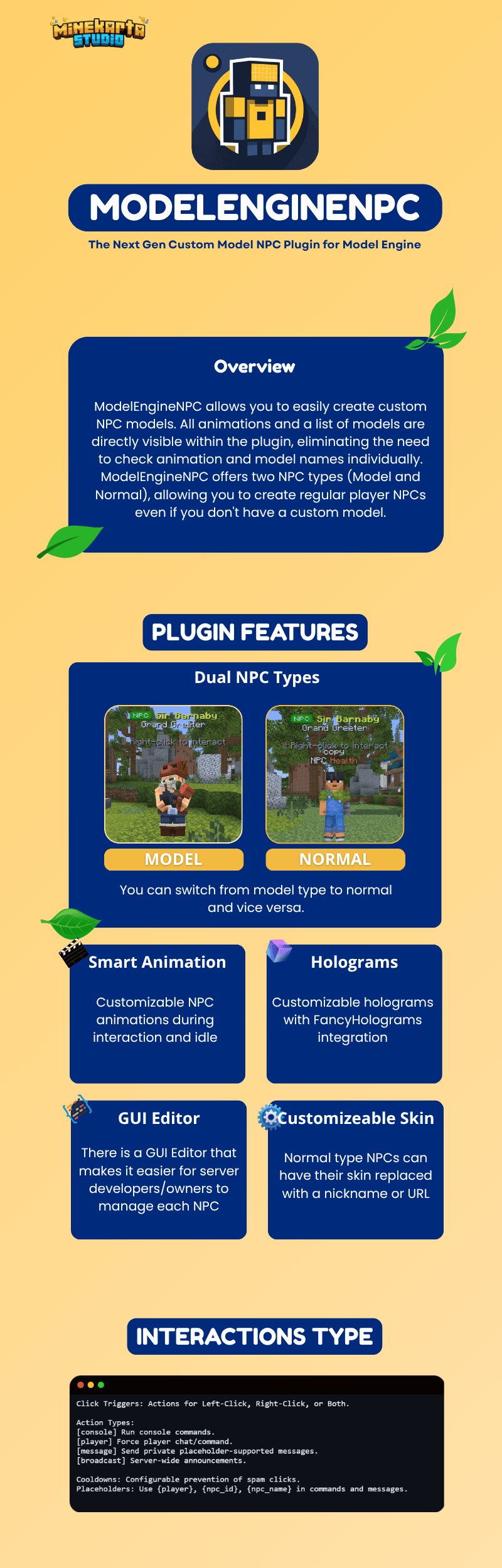
ModelEngineNPC supports two distinct NPC types:
model — ModelEngine NPCs
- Renders using Blockbench models via ModelEngine 4.
- Base entity: invisible ArmorStand (marker, no AI, no gravity).
- Supports animations (idle, interact, custom states).
- Full animation control with speed and looping.
normal — Player NPCs
- Renders as standard Minecraft player entities internally via PacketEvents.
- Supports custom skins from player names or image URLs.
- Async skin fetching with permanent texture caching.
- Shares all interaction and hologram features with model NPCs.
Switching Types at Runtime
You can convert any NPC between types using /menpc setnpctype:
| Conversion | Command | Notes |
|---|---|---|
model → normal |
/menpc setnpctype <id> normal |
Spawns as Steve. Set skin with /menpc setskin. |
normal → model |
/menpc setnpctype <id> model <model-id> |
Model ID required with tab completion. |
🖥️ The GUI Editor
Access the visual editor with /menpc editor.
NPC List
- View all registered NPCs with spawn status indicators.
- Left-click: Open NPC settings editor.
- Right-click: Teleport to the NPC.
- Pagination support for large NPC collections.
NPC Settings Panel
| Setting | Description |
|---|---|
| Model ID / Skin URL | Dynamically adapts to the NPC type |
| Display Name | Set or clear a custom name (MiniMessage supported) |
| Move to Player | Teleport the NPC to your current location |
| Rotation | Set yaw or make the NPC face you |
| LookClose | Toggle player tracking + set radius |
| Respawn | Force despawn + respawn after changes |
| Delete | Shift+click to confirm permanent deletion |
Animation Editor (Model NPCs only)
- Select idle and interact animations from available model animations.
- Toggle idle loop behavior.
- Adjust animation speed with +/- buttons.
- Configure custom animation states.
Interaction Editor
- Add/remove commands for Left-Click, Right-Click, or Both.
- Set click messages per trigger type.
- Enable/disable interaction system.
- Toggle cancel-damage on left-click.
- Adjust interaction cooldown.
Hologram Editor (Requires FancyHolograms)
- All 15+ hologram properties accessible via GUI.
- Add, edit, remove, and reorder hologram lines.
- Visual toggles for shadow, see-through, billboard mode.
👁️ LookClose System
The LookClose system makes NPCs turn their head to face the nearest player.
How to Use
/menpc lookclose <id>           # Toggle on/off
/menpc lookclose <id> true 15   # Enable with 15-block radius
How it Works
| NPC Type | Rotation Method |
|---|---|
model |
Direct entity teleportation — rotation logic fully owned by this plugin |
normal |
Directly sends EntityHeadLook and EntityRotation packets via PacketEvents |
Technical details:
- Runs every 10 ticks for checking distances, updating packets dynamically per player.
- Uses squared-distance comparison for performance.
- Default radius: 10 blocks (configurable per NPC).
🖌️ Skin System
The skin system handles fetching and caching player textures for Normal-type NPCs.
Skin Sources
| Source | Example | API | Speed |
|---|---|---|---|
| Player name | Notch |
Mojang API | ~100-200ms |
| Image URL | https://example.com/skin.png |
Mineskin API | 2-10s |
The input type is detected automatically:
- Starts with
http://orhttps://→ Image URL → Mineskin API - Everything else → Player name → Mojang API
Flow
Player runs /menpc create test normal Notch
   OR       /menpc setskin test Notch
         │
         ▼
┌─────────────────────────────────┐
│  Input detection:               │
│  "Notch" → Player Name          │
│  "https://..." → Image URL      │
└────────────┬────────────────────┘
             │
             ▼  (async, background thread)
┌─────────────────────────────────┐
│  Player Name → Mojang API       │
│  Image URL   → Mineskin API     │
└────────────┬────────────────────┘
             │
             ▼
┌─────────────────────────────────┐
│  Texture cached (value +        │
│  signature) in npcs.yml         │
└────────────┬────────────────────┘
             │
             ▼
┌─────────────────────────────────┐
│  NPC respawns with skin applied │
│  ← Future spawns: instant skin  │
└─────────────────────────────────┘
Key Points
- First spawn: NPC appears as Steve/Alex for a moment while skin loads.
- Subsequent spawns: Cached texture applied instantly — no network call.
- Error resilience: If API is down, NPC still spawns (just without custom skin).
- Changing skins: Use
/menpc setskin <id> <new-source>at any time.
🔮 Holograms
Requires: FancyHolograms plugin
Add floating text above any NPC for labels, lore, or dynamic information.
Quick Start
/menpc hologram guard enable
/menpc hologram guard text <gradient:#FFD700:#FDB931>Royal Guard</gradient>
/menpc hologram guard addline <gray>Click to interact
Customization Options
| Property | Command | Default |
|---|---|---|
| Vertical offset | offset <height> |
2.5 |
| Text scale | scale <float> |
1.0 |
| Background color | background <#AARRGGBB> |
transparent |
| Billboard mode | billboard <CENTER/FIXED/...> |
CENTER |
| Text alignment | alignment <LEFT/CENTER/RIGHT> |
CENTER |
| Text shadow | shadow <true/false> |
false |
| See-through | seethrough <true/false> |
false |
| View distance | viewdistance <blocks> |
-1 (default) |
| Brightness | brightness <block> <sky> |
-1 (default) |
| Update interval | updateinterval <ticks> |
-1 (default) |
Line Management
/menpc hologram <id> addline <text>           # Append line
/menpc hologram <id> setline <index> <text>    # Update line
/menpc hologram <id> removeline <index>        # Remove line
/menpc hologram <id> insertafter <index> <text> # Insert after
/menpc hologram <id> insertbefore <index> <text> # Insert before
/menpc hologram <id> clear                      # Remove all lines
⚡ Interactions
Configure commands and messages that trigger when players click NPCs.
Action Prefixes
| Prefix | Description | Example |
|---|---|---|
[message] |
Send private message | [message] <green>Hello, {player}! |
[console] |
Execute console command | [console] give {player} diamond 1 |
[player] |
Force player command | [player] me waves at the NPC |
[broadcast] |
Server-wide announcement | [broadcast] {player} found a secret! |
Placeholders
| Placeholder | Replaced With |
|---|---|
{player} |
Player name who clicked |
{npc_id} |
NPC's unique ID |
{npc_name} |
NPC's display name |
Commands
/menpc interaction <id> right add [console] give {player} diamond 1
/menpc interaction <id> left set [message] <red>Don't hit me!
/menpc interaction <id> both clear
Settings
- Cooldown: Prevent spam clicks (adjustable in seconds).
- Cancel Damage: Optionally prevent damage when left-clicking.
- Per-Click Messages: Different messages for left vs right click.
⌨️ Commands Reference
All commands use /menpc (alias: /megnpc).
Core Commands
| Command | Description |
|---|---|
/menpc create <id> <type> <model|url> |
Create NPC (model or normal) |
/menpc remove <id> |
Permanently delete an NPC |
/menpc copy <source> <new-id> |
Clone NPC to your location |
/menpc list |
List all registered NPCs |
/menpc teleport <id> |
Teleport to an NPC's location |
/menpc movehere <id> |
Move NPC to your location |
/menpc setmodel <id> <model> |
Change model (model-type only) |
/menpc setname <id> <name> |
Set display name |
| `/menpc name |
false>` |
/menpc rotate <id> <yaw> [pitch] |
Change NPC orientation |
/menpc lookclose <id> [enabled] [radius] |
Toggle/configure player tracking |
/menpc animation <id> <state> <anim> |
Set animation for state |
/menpc play <id> <anim> [loop] [speed] |
Play animation manually |
/menpc interaction <id> ... |
Configure click actions |
/menpc hologram <id> ... |
Configure hologram |
/menpc editor |
Open GUI Editor |
/menpc reload |
Reload configuration files |
/menpc help |
Show help menu |
⚙️ Configuration
config.yml
# How often to auto-save NPC data (in seconds, 0 to disable)
save-interval: 300

# Enable verbose debug logging in console
debug: false

# Default animation names applied to new Model NPCs
default-animations:
  idle: "idle"
  interact: "interact"
messages.yml
All messages use MiniMessage format for rich text.
prefix: "<gradient:#00C9FF:#92FE9D><bold>ModelEngineNPC</bold></gradient> <dark_gray>»</dark_gray> "

npc:
  created: "<green>NPC <gradient:#FFD700:#FDB931><id></gradient> created!</green>"
  removed: "<red>NPC <yellow><id></yellow> has been removed.</red>"
  not-found: "<red>NPC <yellow><id></yellow> not found.</red>"
  copy-success: "<green>NPC <yellow><source></yellow> has been cloned to <yellow><target></yellow>.</green>"
📋 Permissions
| Permission | Description | Default |
|---|---|---|
modelenginenpc.* |
All plugin permissions | OP |
modelenginenpc.command |
Basic NPC management commands | OP |
modelenginenpc.admin |
Admin commands (reload, etc.) | OP |
🧩 Developer API
Maven Dependency
<repositories>
    <repository>
        <id>minekarta</id>
        <url>https://repo.minekarta.com/releases</url>
    </repository>
</repositories>

<dependencies>
    <dependency>
        <groupId>com.minekarta</groupId>
        <artifactId>ModelEngineNPC</artifactId>
        <version>1.3.0</version>
        <scope>provided</scope>
    </dependency>
</dependencies>
Quick Start
import com.minekarta.modelenginenpc.api.ModelEngineNPCAPI;
import com.minekarta.modelenginenpc.npc.NPC;

// Create and spawn
NPC npc = ModelEngineNPCAPI.createNPC("my_npc", "model_id", location);

// Retrieve
NPC npc = ModelEngineNPCAPI.getNPC("my_npc");
NPC npc = ModelEngineNPCAPI.getNPCByEntity(entity);
Collection<NPC> all = ModelEngineNPCAPI.getAllNPCs();

// Manage
ModelEngineNPCAPI.respawnNPC(npc);
ModelEngineNPCAPI.removeNPC("my_npc");

// Advanced
NPCManager manager = ModelEngineNPCAPI.getNPCManager();
API Methods
| Method | Return | Description |
|---|---|---|
createNPC(id, modelId, location) |
NPC |
Create and spawn NPC |
removeNPC(id) |
boolean |
Remove and despawn NPC |
getNPC(id) |
NPC |
Get by string ID |
getNPCByEntity(uuid) |
NPC |
Get by entity UUID |
getNPCByEntity(entity) |
NPC |
Get by Bukkit Entity |
getAllNPCs() |
Collection<NPC> |
Get all registered NPCs |
respawnNPC(npc) |
void |
Despawn + respawn NPC |
getNPCManager() |
NPCManager |
Access internal manager |
🔧 Troubleshooting
Common Issues
NPC spawns without skin
Cause: Skin is being fetched asynchronously. Wait a few seconds for the Mineskin API response.
Solution: The skin will be cached after first fetch. Subsequent spawns will apply it instantly.
SocketTimeoutException in console
Cause: Mineskin API is temporarily slow or unreachable.
Solution: The NPC will still spawn without skin. Retry the create command or wait. The timeout does not block the server.
LookClose not working on normal NPCs
Cause: Using a plugin version older than 1.2.0.
Solution: Update to v1.2.0+ which includes the universal LookClose system.
Model not found
Cause: The ModelEngine model ID does not exist.
Solution: Verify the model is loaded in ModelEngine with /meg list.