LandRealms - Land Claim Plugin
Apr 29, 2026
Exact 1:1 Realm-Based Land Claiming Plugin like Originrealms with Advanced GUI menu
🌟 Features
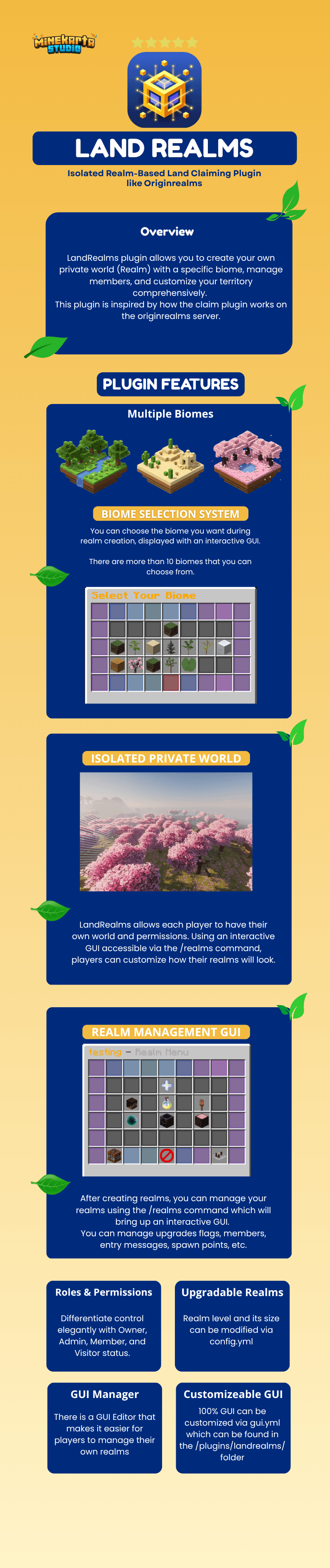
- Private Realms: Get your own isolated land in a dedicated world grid system.
- Natural Biomes: Choose a biome (Forest, Desert, etc.) and the plugin will automatically locate a naturally generated world section for you. No fake terraforming!
- GUI Management: Manage everything—from members and realm upgrades to environmental settings—through beautiful, modern menus driven by Inventory Framework.
- Role Hierarchy System: Differentiate control elegantly with Owner, Admin, Member, and Visitor status.
- Safety & Persistence: Complete data retention via SQLite/H2 storage. Deletion confirmation systems prevent accidental loss of realms.
🚀 Getting Started
Creating Your First Realm
- Run the command
/realm create <name>.- Example:
/realm create MyCastle
- Example:
- A menu will open showing available Biomes.
- Click on a biome (e.g., Plains, Desert, Cherry Grove).
- Confirm the selection.
- Note: Finding a perfect biome might take a moment. You will see a "Creating..." message.
- Once found, you will be teleported to your new realm automatically!
Deleting a Realm
If you want to start over:
- Run
/realm delete <name>.- You must provide the exact name of the realm to prevent accidental deletions.
- The plugin will ask for confirmation via a dedicated GUI or chat prompt.
- Type
/realm confirmto permanently delete it.- Warning: This action permanently deletes your realm region and cannot be undone!
🎛️ Realm Management (GUI)
Run /realm to open the main control panel. From here you can access everything:
👥 Member Management (/realm) -> Members
- Role Hierarchy: Promote or demote players through left or right clicks within the GUI.
- Interactive Invites: Clicking the "Invite Player" book sends a rich-text Component to your chat. Click the glowing text in your chat to automatically type
/realm inviteso you just fill in their name! - Kick GUI: Safely kick rogue members using the built-in confirmation dialogues.
🛡️ Protection Flags (/realm) -> Flags
- Environmental Control: Toggle settings to protect against explosions, fire spread, leaf decay, snow accumulation, and crop trampling.
- Combat: Enable/disable Player-vs-Player (PVP) combat.
- Interaction: Decide if Visitors or Members can break blocks, open chests, or interact with redstone components.
⬆️ Upgrades & Options
- Size Upgrades: Purchase expansions to grow your realm boundary.
- Member Capacity: Pay in-game currency (requires Vault) to increase your maximum realm member slots.
👑 Roles & Permissions
Understanding what each role can do:
| Role | Capabilities |
|---|---|
| OWNER | Absolute control. Can delete the realm, transfer ownership, purchase upgrades, and manage all roles. Cannot be kicked or demoted. |
| ADMIN | Can manage (invite/kick/promote/demote) Members and Visitors. Can toggle Protection Flags. Inherits all lower permissions. |
| MEMBER | Can build, break, interact, and use containers within the realm boundary (as defined by active Flags). Cannot change settings. |
| VISITOR | Default state for non-members. View-only access by default unless specific Visitor flags (e.g., VISITOR_INTERACT) are enabled. |
📜 Commands
Player Commands
| Command | Description | Permission |
|---|---|---|
/realm or /realms |
Open the main menu. | landrealms.command.realm |
/realm create <name> |
Start creating a new realm. | landrealms.command.realm.create |
/realm delete <name> |
Request to delete a specific realm. | landrealms.command.realm.delete |
/realm confirm |
Confirm a pending action. | landrealms.command.realm.delete |
/realm list |
Show a list of your owned realms. | landrealms.command.realm.list |
/realm info [name] |
View info about your current realm or a specific realm. | landrealms.command.realm.info |
/realm invite <player> |
Invite a friend to your realm. | landrealms.command.realm.invite |
/realm kick <player> |
Remove a member. | landrealms.command.realm.kick |
/realm leave |
Leave someone else's realm. | landrealms.command.realm.leave |
/realm spawn |
Teleport to your realm. | landrealms.command.realm.spawn |
Admin Commands
| Command | Description | Permission |
|---|---|---|
/realmadmin list (/realmsadmin) |
List all realms on the server. | landrealms.command.realmadmin.list |
/realmadmin delete <realm> |
Force delete a specific realm. | landrealms.command.realmadmin.delete |
/realmadmin tp <realm> |
Teleport to any realm. | landrealms.command.realmadmin.tp |
/realmadmin setowner |
Transfer realm ownership. | landrealms.command.realmadmin.setowner |
/realmadmin bypass |
Bypass all realm protections. | landrealms.command.realmadmin.bypass |
/realmadmin setspawn |
Set fallback spawn for realm deletion. | landrealms.command.realmadmin.setspawn |
⚙️ Customizing Messages
All player-facing text is defined in messages.yml. The file is organized by namespace — each top-level key groups related messages:
| Namespace | Contains |
|---|---|
realm: |
All realm lifecycle messages (creation, deletion, spawn, teleport, flags, upgrades, entry/exit) |
member: |
Member management messages (kick, leave, promote, demote) |
invite: |
Invitation workflow messages |
titles: |
On-screen title/subtitle messages shown when entering/leaving realms |
protection: |
Messages shown when a protected action is blocked |
economy: |
Transaction and balance messages |
gui: |
GUI item names and lore text |
biomes: |
Biome display names and descriptions |
admin: |
Admin command feedback |
All messages use MiniMessage format — no legacy § codes are supported or needed:
# Example: messages.yml customization
realm:
  enter-own: "<#6bcb77>Welcome back to your realm."
  enter-other: "<#64dfdf>Entering {realm} (Owner: {owner})"
  teleport-success: "<#6bcb77>Teleportation successful."
  spawn-set: "<#6bcb77>The realm spawn point has been established at your current location."
  flag-set: "<#6bcb77>Flag {flag} has been set to {value}."
Note: Placeholders use
{placeholder}syntax (e.g.,{realm},{player},{owner},{cost}).
🌿 Biomes
When creating a realm, you can choose from these biomes. The plugin searches for a naturally generated spot in the world. Availability depends on your server version (e.g., 1.20+ for Cherry Grove).
- 🌲 Forest
- 🏜️ Desert
- ❄️ Snowy Plains
- 🌾 Plains
- 🌸 Cherry Grove
- 🦇 Dark Forest
- 🦁 Savanna
- 🌴 Jungle
- 🧱 Badlands
- 🐸 Swamp
🏷️ PlaceholderAPI Integrations
LandRealms provides a comprehensive list of placeholders for your server's scoreboard, action bars, or GUIs!
| Placeholder | Output |
|---|---|
%landrealms_has_realm% |
true/false |
%landrealms_max_realms% |
Max allowed realms for the player |
%landrealms_can_create_realm% |
true/false (Checks slots & cost) |
%landrealms_realm_count% |
Number of realms the player owns |
%landrealms_realm_name% |
Name of the primary realm |
%landrealms_realm_owner% |
Name of the realm owner |
%landrealms_realm_members% |
Number of members |
%landrealms_realm_members_max% |
Maximum member slots |
%landrealms_realm_members_online% |
Number of members currently online |
%landrealms_realm_level% |
Current level of the realm |
%landrealms_realm_is_max_level% |
true/false |
%landrealms_realm_next_level_cost% |
Cost to upgrade to next level |
%landrealms_realm_biome% |
Biome of the realm |
%landrealms_current_in_realm% |
true/false (If currently inside any realm) |
%landrealms_current_realm% |
Name of the realm the player is standing in |
%landrealms_current_pvp_enabled% |
true/false (PvP flag of current realm) |
%landrealms_current_explosions_enabled% |
true/false (Explosions flag of current realm) |
❓ FAQ
Q: I clicked confirm but nothing happened immediately? A: Finding a natural biome mathematically takes a few ticks natively. The menu closes so you can keep playing, and you'll be notified via Title/Subtitle teleportation once it's ready!
Q: Can I have multiple realms?
A: Yes, if the server configuration config.yml enables /realm create.
Q: How do I see my realms?
A: Use /realm list to see all realms you own.